# Register a Portal

[Portals](/verax-documentation/core-concepts/portals.md) are smart contracts that are registered in the "Portal Registry" and that you can consider as the entrypoint to the Verax Attestation Registry. This is where the payloads to be attested start their journey.

## Portal creation

To create a Portal, you must first deploy a contract that inherits the [`AbstractPortalV2`](https://github.com/Consensys/linea-attestation-registry/blob/main/contracts/src/abstracts/AbstractPortalV2.sol) abstract contract. This portal contract is where you create attestations in the registry. You have full control over the logic in this contract, so long as it inherits the base `AbstractPortalV2` contract.\
\
The function that you will call to issue an attestation is:

```solidity
function attest(AttestationPayload memory attestationPayload, bytes[] memory validationPayload) public payable;
```

The `attest` function accepts 2 arguments:

1. `attestationPayload`, the raw attestation data that will be stored in the registry
2. `validationPayload`, validation logic that the module needs to execute its verification logic

This function allows you to actually create attestations, you can call the various modules and/or apply any other logic you need to. The convention is to keep as much logic as possible in modules, but it is up to you how you implement your own domain logic. You can choose to override this function and add your own logic, or use the function as defined in `AbstractPortal`.

{% hint style="warning" %}
While you can put whatever logic you want to in your portal contracts, it is strongly advised that you keep your portal as modular as possible, which means keeping your logic in modules. In the future, we \_may\_ pivot to no-code portals, which have no contract, and which simply execute a specific chain of modules!
{% endhint %}

As well as implementing the `AbstractPortalV2` interface, the Portal contract must also implement the [IERC165Upgradeable](https://github.com/OpenZeppelin/openzeppelin-contracts-upgradeable/blob/master/contracts/utils/introspection/IERC165Upgradeable.sol) interface, which involves including this function:

```solidity
function supportsInterface(bytes4 interfaceID) public pure override returns (bool) {
  return interfaceID == type(AbstractPortalV2).interfaceId || interfaceID == type(IERC165Upgradeable).interfaceId;
}
```

## Lifecycle Hooks

The `AbstractPortalV2` contract defines the following life cycle hooks:

* onAttest
* onReplace
* onBulkAttest
* onBulkReplace
* onRevoke
* onBulkRevoke

These lifecycle hooks can be overridden in the concrete implementation of the Portal, and can be used to implement additional logic and specific points in the lifecycle of an attestation.

## Portal registration

Portal registration takes 5 parameters, defined as follows:

<table><thead><tr><th width="155.08201438848917">Parameter</th><th width="114">Datatype</th><th>Description</th></tr></thead><tbody><tr><td>id</td><td>address</td><td>Address of the Portal</td></tr><tr><td>name</td><td>string</td><td>A descriptive name for the Portal</td></tr><tr><td>description</td><td>string</td><td>A description of the Portal's functionality</td></tr><tr><td>isRevocable</td><td>bool</td><td>Whether attestations issued by the portal can be revoked</td></tr><tr><td>ownerName</td><td>string</td><td>The portal owner's name</td></tr></tbody></table>

## Manually registering a deployed Portal in the `PortalRegistry` contract

Once you have deployed your Portal contract, you can then register it in the `PortalRegistry` contract using the `register` function:

```solidity
function register(address id, string memory name, string memory description, bool isRevocable, string memory ownerName);
```

**A few caveats**: a Portal contract must be first deployed and cannot be registered twice under different names. Also, the name, description and owner name must not be empty.

## Using a blockchain explorer

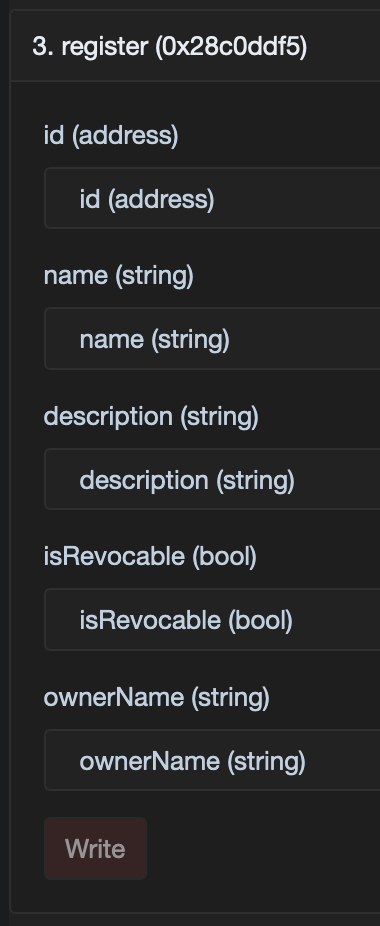
Instead of crafting the smart contract call by hand, you can benefit from a chain explorer interface. Let's use the Linea Sepolia explorer, [Lineascan](https://sepolia.lineascan.build).

<figure><img src="/files/Jw4q76kVpkRBSNiFe176" alt="" width="190"><figcaption><p>The form generated by Lineascan to interact with the <code>PortalRegistry</code> contract</p></figcaption></figure>

1. Retrieve the `PortalRegistry` contract address from the [project README](https://github.com/Consensys/linea-attestation-registry?tab=readme-ov-file#contracts-addresses)
2. Access the `PortalRegistry` contract on [Lineascan](https://sepolia.lineascan.build/address/0xF35fe79104e157703dbCC3Baa72a81A99591744D)
3. Go to the ["Contract" tab](https://sepolia.lineascan.build/address/0xF35fe79104e157703dbCC3Baa72a81A99591744D#code)
4. Go to the ["Write as Proxy" tab](https://sepolia.lineascan.build/address/0xF35fe79104e157703dbCC3Baa72a81A99591744D#writeProxyContract)
5. Connect your wallet and fill the `register` form with the parameters described above
6. Send the transaction

## Using the official Verax SDK

We have seen rather manual ways to register a Portal, now let's focus on the easiest way: via the Verax SDK.

{% hint style="info" %}
Check \[this page]\(<https://docs.ver.ax/verax-documentation/developer-guides/tutorials/from-a-schema-to-an-attestation#id-2.-instantiate-the-verax-sdk>) to discover how to instantiate the Verax SDK.
{% endhint %}

Once you have an SDK instance, you can register a Portal like this:

```typescript
await veraxSdk.portal.register(
        id: "0xD39c439cD3Ae5E1F3c7d13985aDAC90846284904",
        name: "ExamplePortal",
        description: "This Portal is used as an example",
        isRevocable: true,
        ownerName: "Verax",
);
```

## Using a default Portal

If you opted for a default Portal as described [here](/verax-documentation/developer-guides/for-attestation-issuers/create-a-portal.md#using-a-default-portal), good news: it was registered while being deployed!


---

# Agent Instructions: Querying This Documentation

If you need additional information that is not directly available in this page, you can query the documentation dynamically by asking a question.

Perform an HTTP GET request on the current page URL with the `ask` query parameter:

```
GET https://docs.ver.ax/verax-documentation/developer-guides/for-attestation-issuers/register-a-portal.md?ask=<question>
```

The question should be specific, self-contained, and written in natural language.
The response will contain a direct answer to the question and relevant excerpts and sources from the documentation.

Use this mechanism when the answer is not explicitly present in the current page, you need clarification or additional context, or you want to retrieve related documentation sections.
